How to Set Up Apple CarPlay® in a Honda Vehicle
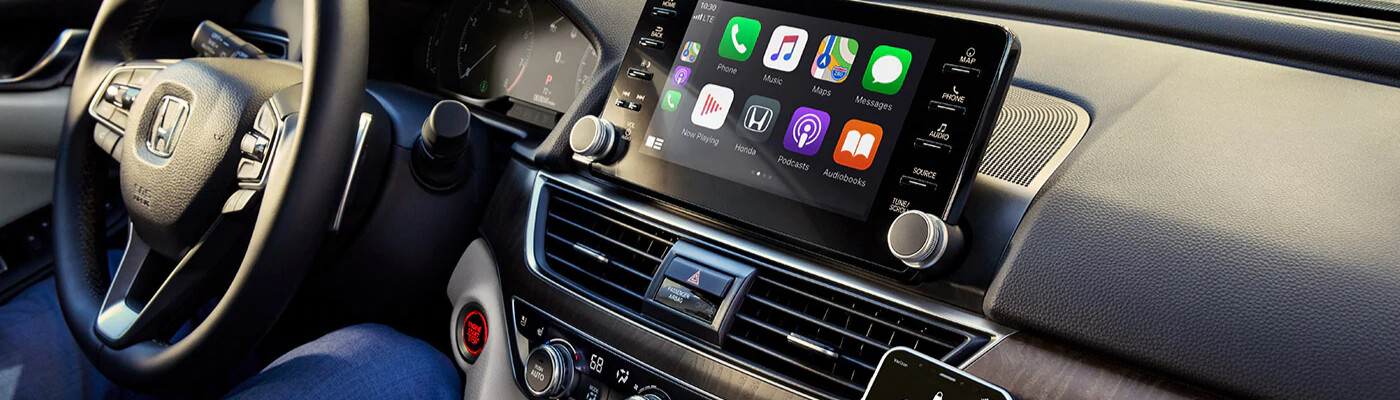
Are you in the process of figuring out all the cool features in your new Honda automobile? If so, you’re probably eager to learn how to set up Apple CarPlay® in your Honda. Or how to use the Android Auto™ wireless capabilities. So, we’ve put together the guide below on setting up Apple CarPlay® and how to use Android Auto without USB.
How to Set Up Apple Carplay® on a Honda via USB
- Switch on the ignition
- Turn on Siri
- Plug your phone to the car with an Apple USB cord. Using an off-brand cable may cause issues.
- To use Siri, say your voice command while holding down the voice button on your steering wheel.
How to Set Up Apple CarPlay® on a Honda Without a USB
- Open the Settings on your Apple device
- Select “General”
- Select “CarPlay”
- Turn on Bluetooth® on your device
- Tap “Enable Wireless CarPlay”
- To pair your device with the car, either choose the option from the stereo system’s menu or hold the voice button on your steering wheel.
How to Use Android Auto™ via USB
- Connect the device to your car using a USB cable
- Confirm that Android Auto™ is installed on your phone (this built into Android 10.0 and later)
- Follow the instructions displayed on your device to complete setup.
- Select Android Auto™ from the car’s display. Follow the onscreen instructions
How to Use Android Auto™ Wireless Capabilities (Set up with USB)
Skip to the next section for instructions on how to use Android Auto™ without USB if you would like to set it up without a cord. This method requires using a USB cord for the initial setup only.
- Turn on your device’s Bluetooth®, Wi-Fi, and Location Services
- Confirm that Android Auto™ is installed on your phone (this built into Android 10.0 and later)
- Make sure the car is in Park
- Connect the device to your car using a USB cable
- Follow the on-screen instructions to complete setup
- Tap Android Auto™ on your car display to start wireless connection
How to Use Android Auto™ Wireless (Set up without USB)
A lot of Dyersburg drivers prefer to set up their apps wirelessly. If you would like to set up Android Auto™ wirelessly, follow these instructions on how to use Android Auto™ without a USB cord:
- Confirm that your phone is running on Android 6.0 (Marshmallow) or later
- Confirm that Android Auto™ is installed on your phone (this built into Android 10.0 and later)
- Open Android Auto™ on your phone
- Pair the phone with the car via Bluetooth
- Select the Android device from the list on your car’s screen to auto launch Android Auto
Take a Look at Our Other Tips and Tricks
The service department at %%di_name% will happily assist you with any automotive issues that may arise. Why not check out our service specials? And, if you enjoyed this guide on connecting Apple CarPlay® and Android Auto™, we’ve got plenty of other tips and tricks right on this website. We’re just down the road from Brownsville, so drop by or contact us today!
More from Victory Honda of Jackson
Your vehicle’s brake system is one of its most important safety features. Whether you’re commuting to work, taking a road trip, or running errands around town, reliable brakes help keep you, your passengers, and everyone else on the road safe. While brake components are built to last, they do wear down over time. Recognizing the…
Read More
Buying a new vehicle in the next few years could come with an additional tax benefit. Under a provision of the One Big Beautiful Bill Act, eligible taxpayers may be able to deduct up to $10,000 in qualifying vehicle loan interest each year for tax years 2025 through 2028. Unlike many tax deductions that require…
Read More
September is National Preparedness Month, making it the perfect time to think beyond routine vehicle maintenance and prepare for the unexpected. Whether you’re commuting to work, taking the kids to school, or heading out on a road trip, having a well-stocked emergency kit in your vehicle can make a big difference if you encounter a…
Read More